The Ultimate Guide to Podcast Production & Editing (2025 Edition)
Author’s note: This comprehensive podcast production and editing guide is meant to be your go‑to resource for creating, editing, and growing a podcast in 2025. Whether you’re an aspiring host or a seasoned creator looking to level up your production quality, we’ll walk through every stage of the journey, from planning and recording to post‑production, publishing, and promotion.
Along the way, you’ll see up‑to‑date stats, expert tips, and actionable frameworks drawn from industry research. I’ve structured the guide with clear H1–H4 labels so editors and readers can navigate easily.
The Booming Podcast Landscape in 2025
Podcasting by the Numbers
Podcasting has grown from a niche hobby into a mainstream storytelling platform. According to DemandSage, there are 4.61 million podcasts worldwide in 2025, and global listeners are projected to reach 584.1 million this year.

Listeners are also spending more time with shows. On average, people listen for seven hours per week. The United States alone has 109.1 million listeners, a steady rise from previous years. Spotify leads with 37 percent of global listeners, followed by Apple Podcasts with 32.9 percent.
This growth means opportunity, but also competition. Strong production and thoughtful editing are what help creators stand out.
Why Quality Production Matters

A good idea will only get you so far. Poor audio quality, rambling conversations, and sloppy editing push listeners away. Surveys consistently show that audio quality is one of the top reasons people stay loyal to a show.
Editing is more than removing mistakes. It shapes pacing, narrative clarity, and emotional impact.
Time investment varies drastically:
- Minimal editing for a 30-minute episode can take about 15 minutes.
- Heavily produced one-hour episodes can require 3 to 5 hours.
- LucidLink’s benchmarks:
- Light editing: 2 to 3 times the episode runtime
- Heavily edited interviews: 4 to 6 times the runtime
- Documentary style: 8 to 10 times the runtime
Understanding these realities helps you build a sustainable workflow.
Beyond Audio: The Rise of Video Podcasts

Storyblocks
Platforms like YouTube and Spotify continue pushing video podcasting. AI tools now generate captions, transcripts, and clips, making video workflows easier than before. Video requires more production work, but widens your reach significantly.
This guide focuses on audio production but notes where video workflows differ.
Planning and pre‑production

Define Your Concept and Goals
Before you record a single word, clarify what your show is about and why you’re making it. Buzzsprout’s step‑by‑step guide suggests narrowing your niche and defining your goals. Ask yourself:
- Why are you starting this podcast? Are you generating leads, building authority, telling stories, or exploring a passion? Being clear about your “why” helps maintain motivation when the novelty wears off.
- Who are you speaking to? Developing a target listener persona ensures that topics and tone resonate with your intended audience.
- What makes your show unique? Carve out a niche so you’re not competing directly with thousands of similar shows.

A good test for your concept is whether you can brainstorm at least ten episode ideas quickly. If you struggle after a few, your topic may be too narrow or uninspiring. In the crowded 2025 landscape, specificity helps: instead of a general “entrepreneurship” show, focus on “sustainable startups in emerging markets.”
Choose Your Format and Structure
Common formats include:
- Interview
- Solo
- Co-hosted
- Narrative nonfiction
- News recap
- Scripted fiction
Your format should match your energy, creativity, and goals.
Episode length trends (Buzzsprout):

Riverside
- 20–40 minutes: 31 percent of podcasts
- 40–60 minutes: 22 percent
- Under 10 minutes: 14 percent
- Over 60 minutes: 7 percent
Choose a release cadence you can maintain consistently.
Naming and Branding Your Show

Spotify for Creators
Apple Podcasts recommends choosing a title that is clear and specific. Avoid vague names like “The Weekly Update.”
Make sure:
- The podcast name is available on social media
- You have a matching domain
- The name reflects your tone and niche
Cover art should follow platform specs: square format, ideally 3000 x 3000 pixels, readable at thumbnail size, and consistent with your brand.
Script and Outline

Even free‑flowing conversation podcasts benefit from an outline. Outlining ensures you hit all the key points, ask thoughtful questions, and avoid forgetting important details. For narrative or educational shows, a full script may be required. When scripting, keep sentences short, and conversational writing for the ear is different from writing for the page. Leave room for spontaneity and interaction.
Create a structure with an engaging hook, clear segments (e.g., intro, interview, Q&A, closing), and a strong call‑to‑action (CTA). If you plan to include adverts or sponsored messages, mark these in your script to maintain a natural flow.
Assemble Your Production Equipment
Microphones and Accessories

Dynamic microphones are best for untreated rooms. Condenser microphones offer more detail but require quiet spaces.
Follow these guidelines:
- Place the mic 2 inches from your mouth for warmth
- Use the 3:1 rule between multiple mics
- Add accessories like pop filters, boom arms, shock mounts, and closed-back headphones
Invest in accessories such as:
- Pop filters to reduce plosive sounds (p and t bursts).
- Mic stands or boom arms to position the mic comfortably and manage cables.
- Shock mounts isolate the microphone from desk vibrations.
- Headphones for monitoring your audio in real time.
Audio Interface and Recording Devices

If you’re using XLR microphones, you’ll need an audio interface or a hard‑disk recorder. Interfaces convert analog signals into digital data and often include preamps and headphone outputs. Portable recorders (e.g., Zoom, Rode, Sound Devices MixPre) are ideal for multi‑mic setups or recording in remote locations; you can later dump the files into your digital audio workstation (DAW) for editing.
Recording Environment and Technique

A quiet, acoustically treated room dramatically improves audio quality. Use carpets, curtains, foam panels, or even blankets to reduce echoes. Avoid recording near noisy appliances or windows. If your space is less than ideal, record closer to the microphone and use directional mics to minimize room tone.
LucidLink advises keeping the mic about 6 inches away at a 45‑degree angle to avoid plosive pops and recording each speaker on a separate track for flexibility in editing. Record at 24‑bit/48 kHz for professional headroom. When recording remotely, platforms like Riverside.fm or Streamyard provide high‑quality audio capture over the internet. Always monitor levels to avoid clipping (peaking) or under‑recording.
Recording and Production Techniques
Recording Workflow

Checklists and Dry Runs
Conduct a test recording before the actual session. Use this to set levels, test your hardware, and familiarize guests with the process. The iZotope guide suggests an informal dry run to test your format and adjust scripts and timing. Create a pre‑show checklist covering:
- Mic setup
- Recording software settings
- Internet stability (for remote guests)
- Guest soundcheck instructions
Multi-Track vs Single-Track Recording
Record each speaker on separate tracks. Single-track recording limits your editing flexibility.
Managing Guests and Interviews

Interview podcasts thrive on chemistry and insightful questions. Do your research; tailor questions to your guest’s expertise; and structure the conversation with a beginning, middle, and end. Listen actively rather than sticking rigidly to a script.
Politely redirect rambling or off‑topic tangents, noting the timecode if you plan to edit them out later. Encourage guests to click their fingers or clap when they make a mistake; this creates a visual spike in the waveform that’s easy to spot in the edit.
Remote Recording Best Practices

Remote interviews are common. To ensure quality:
- Ask guests to wear headphones
- Provide prep instructions
- Use a platform that records locally
- Always record a backup
Capturing Ambient and Foley Sounds
For narrative podcasts or audio dramas, gather ambient sounds (room tone, location noise) and Foley effects (footsteps, door creaks). These elements enrich storytelling but require careful planning. Record ambient sound separately for at least 30 seconds; this helps maintain continuity during editing.
Editing and Post‑production
Editing transforms raw recordings into polished episodes. We’ll follow the seven‑step workflow described in LucidLink’s 2025 guide and supplement it with tips from iZotope and The Podcast Host.
Step 1: Prepare Your Files
Download your recordings and organize them immediately. Create a consistent folder structure (e.g., “Show Name > Season # > Episode # > Raw Audio | Music | Sponsors | Exports”) and use logical file naming conventions.
Adopt the 3–2–1 backup rule: keep three copies of your data, on two different media types, with one copy offsite or in the cloud. Synchronize multi‑track recordings into one timeline in your DAW and import any music or sound effects libraries.
Step 2 – Clean up the Audio
Before you start cutting, improve the raw sound. LucidLink recommends:
- Noise reduction: remove background hums and hiss using high‑pass filters or built‑in noise reduction tools.
- Equalization (EQ): cut unnecessary low‑end rumble and harsh high‑frequency sibilance.
- Compression: reduce the dynamic range to keep voices consistent in volume.
- Normalization: balance overall loudness across tracks.
AI tools can accelerate cleanup. Adobe Podcast Enhance uses artificial intelligence to remove noise and improve speech clarity, but comes with upload limits (500 MB, 30-minute files, 1 hour of processing per day on the free plan). Paid versions allow higher limits and adjustable processing strength. Similar tools include Riverside’s Magic Audio and Descript’s Studio Sound.
Step 3: Cut the Fluff and Shape the Story
Trimming is where you craft the episode’s narrative. Remove long silences, filler words (“um,” “like”), false starts, and off‑topic digressions. At the same time, avoid over‑editing; leave breaths and emotional pauses to maintain a natural rhythm. Pay attention to pacing: ensure a strong opening hook, smooth transitions, and a consistent flow.
For interview shows, rearrange segments if necessary to enhance coherence. Use crossfades between cuts to avoid abrupt jumps.
Step 4: Add Music, Transitions, and Effects
With the structure in place, add your intro and outro music, stings between segments, sound effects, and sponsor messages. Always check that audio levels remain consistent when introducing music or ads. Fade in and out to smooth transitions. Don’t overuse effects; subtlety is key. Many podcasters create a reusable template in their DAW with music tracks and markers to streamline this step.
Step 5: Mix and Master
Mixing balances individual tracks; mastering prepares the final file for distribution. Aim for a loudness of –20 to –16 LUFS (integrated loudness units relative to full scale). Check your mix on different playback systems: headphones, car speakers, laptop speakers, to ensure it translates well. Export to a standard format such as MP3 at 128 kbps and 44.1 kHz mono. Some platforms support higher‑quality AAC files; choose according to the platform’s limitations.
Step 6: Review and Revise
Do a final listen or skim through while checking any editorial notes. Share a draft with collaborators and incorporate feedback. Keep track of version numbers to avoid confusion. If you’re collaborating remotely, use cloud storage or platforms like LucidLink to streamline file sharing and eliminate slow downloads and sync errors, which are common workflow bottlenecks.
Step 7: Avoid Common Editing Mistakes
LucidLink’s guide warns against several pitfalls:
- Poor file management
- Over-processing
- Inconsistent volume
- Abrupt cuts
- Missing transitions
- Incorrect LUFS
Being aware of these mistakes will help you produce a professional‑sounding podcast that respects listeners’ time and attention.
Tools and Software for Editing in 2025

Digital Audio Workstations (DAWs)
A DAW is the centerpiece of your editing workflow. According to iZotope, a DAW is a program used to record, edit, mix, and master audio. Your choice depends on budget, complexity, and learning curve.
Audacity
Audacity remains a popular choice because it’s free, open‑source, and cross‑platform. It offers multitrack recording, noise reduction, EQ, pitch, and reverb effects, and supports third‑party plugins. Audacity is ideal for quick edits and beginners, but lacks some advanced features and a slick interface compared to paid DAWs. Collaboration requires a separate platform, such as Audio.com.
Adobe Audition
Adobe Audition is a pro‑grade DAW with a comprehensive suite of tools. It includes silence removal, AI‑powered speech enhancement, waveform and frequency displays, loudness meters, and surround sound editing. Audition doesn’t require uploading media to the cloud, making it suitable for editors who prefer local workflows. However, it has a steeper learning curve and costs $22.99/month. Collaboration requires separate file‑sharing solutions.
Reaper and Hindenburg
Reaper is a low‑cost DAW that offers a robust feature set and a supportive community. It’s more flexible than Audacity but still affordable. Hindenburg Pro, designed for journalists and spoken‑word storytellers, streamlines workflows with intuitive tools and organizational features. Its focus on narrative editing makes it ideal for documentary and interview podcasts.
Descript
Descript revolutionizes podcast editing by letting you edit audio like a text document. After transcribing your recording, you can cut words and sentences in the transcript, and the corresponding audio edits automatically follow.
Descript’s AI tools can remove silence and filler words, replace dialogue with synthetic speech, generate social clips, and produce show notes. The trade‑off is that you must upload your media and rely on cloud processing. Descript is perfect for beginners or teams that value collaboration and speed.
Plugins and Effects

Popular choices include:
- iZotope RX
- FabFilter Pro Q
- Waves Vocal Rider
- Sonnox Dynamics
AI‑powered tools such as Adobe Podcast Enhance, Riverside Magic Audio, and Descript Studio Sound leverage machine learning to improve audio quality automatically. Use them judiciously and compare results with manual processing.
File Management and Collaboration
Efficient collaboration reduces bottlenecks. LucidLink identifies common challenges such as messy file handoffs, slow downloads, and sync errors. Cloud‑based solutions like LucidLink, Dropbox, Google Drive, and Frame.io allow multiple editors to work on large media files simultaneously without downloading them locally. Use version control and naming conventions to avoid confusion.
Publishing, Distribution, and Promotion
Choose a Podcast Host

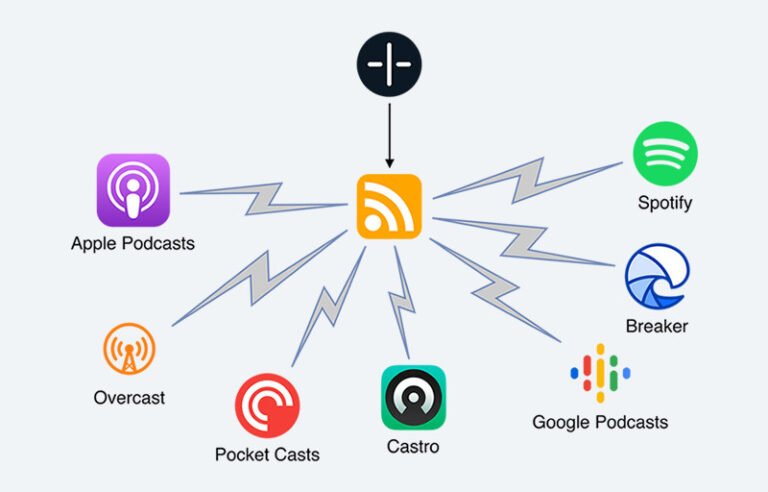
To distribute your podcast, you need a hosting provider that stores your audio files and generates your RSS feed. Popular hosts include Buzzsprout, Podbean, Libsyn, Anchor (now Spotify for Podcasters), and Simplecast. Consider factors like storage limits, analytics, monetization features, and pricing. Many hosts offer free tiers with basic functionality.
Get Listed on Major Platforms
Submit your RSS feed to:
- Spotify
- Apple Podcasts
- Google Podcasts
- Amazon Music
- TuneIn
- Deezer

Write Show Notes and Transcripts

Show notes summarize episode content, highlight key topics, and provide links to resources mentioned during the episode. They improve SEO by giving search engines text to index. Many listeners read show notes before deciding to listen. Consider including timestamps for major segments and CTAs to your website or product.
Transcripts make your podcast accessible to deaf or hard‑of‑hearing audiences and help with searchability. Tools like Otter.ai, Descript, and Rev offer automated transcription services. Edit transcripts for accuracy and readability before publishing.
Promote Across Channels

Repurpose episodes into:
- TikTok and Reels clips
- YouTube Shorts
- Blog posts
- Newsletters
Cross‑promotion with other podcasters can expose your show to new audiences. Guest appearances on similar podcasts or having guests share their episode with their followers are effective ways to grow.
Understand Podcast SEO
Just like written content, podcasts need optimization for search engines. Include primary keywords (e.g., “podcast production,” “how to edit podcasts”) in your titles, descriptions, and tags. Use semantic variations and related terms to capture broader search intent (e.g., “audio editing techniques,” “mixing and mastering podcasts”).
Embedding transcripts on your website helps search engines index the spoken content. Acquire backlinks by featuring experts and then asking them to link to their episodes.
Monetization and Growth Strategies

Sponsorships and Advertising
A common monetization method is selling ad spots. Rates are often measured in cost per thousand listens (CPM). According to iZotope’s production guide, podcast advertisers pay around $18 per 1,000 listens. As your audience grows, you can negotiate higher rates or sign with ad networks that match advertisers to shows.
You can also integrate affiliate marketing by recommending products and earning a commission on sales. Always disclose affiliate relationships to maintain listener trust.
Listener Support and Premium Content
Platforms like Patreon, Supercast, and Apple Podcast Subscriptions let listeners support you with monthly contributions in exchange for bonus content, early access, or ad‑free episodes. Consider offering behind‑the‑scenes episodes, AMA (Ask Me Anything) sessions, or merch discounts to incentivize subscriptions.

Merchandise and Live Events
Sell branded items or host virtual and in-person events.
Build Long-Term Authority
Podcasting is a long game. Consistency builds trust and authority; sporadic publishing can cause listeners to drop off. Use content pillars, a set of core topics that your show consistently covers, to anchor your narrative.
This aligns with the Koray Tugberk Gubur framework, which emphasizes creating networks of related content that interlink to build topical authority. For example, if your pillar topic is “podcast production,” create supporting episodes on microphones, editing software, interview techniques, marketing strategies, and monetization. Interlinking these episodes in your show notes and blog posts helps search engines and listeners understand the breadth of your expertise.
Trends and the Future of Podcast Production

AI and Automation
AI is transforming podcasting. Tools like Adobe Podcast Enhance, Descript’s filler‑word removal, and Auphonic’s automatic leveling reduce manual editing time. Generative AI can draft scripts, create synthetic voices, and even suggest segment outlines. Voice cloning technology allows hosts to generate intros or adverts without re‑recording. However, listeners still crave authenticity; use AI to augment, not replace, human creativity.
Interactive and Personalized Podcasts
Emerging platforms experiment with interactive elements such as branching narratives, real‑time audience polls, and personalized ad insertion. Smart speakers and podcast apps increasingly support dynamic content insertion based on listener preferences or location. As adoption grows, consider how to craft episodes that adapt to different paths while remaining coherent.
Podcast Networks and Consolidation
Large media companies continue to acquire successful podcasts and producers, forming networks that cross‑promote shows and share resources. Independent podcasters may benefit from joining a network to tap into shared marketing power, but weigh the trade‑offs (e.g., revenue sharing, creative control).
Regulation and Accessibility
As podcasts reach mass audiences, governments and platforms are paying more attention to content moderation, copyright compliance, and accessibility. Transcripts and captions will likely become mandated, especially for video podcasts. Staying ahead of compliance ensures your show remains accessible and avoids disruptions.
Frequently Asked Questions (FAQ)
1. How long does it take to produce and edit a podcast episode?
It depends on the level of production. Minimal editing can be as quick as 15 minutes for a 30‑minute episode. A highly produced one‑hour episode with music and sound design may require three to five hours. Another guideline is 2–3× the runtime for light edits, 4–6× for heavily edited interviews, and 8–10× for documentary‑style shows.
2. What’s the best editing software for beginners?
Audacity is free and offers essential tools like noise reduction, EQ, and multitrack editing. Descript provides an intuitive transcript‑based interface that lets you edit audio by editing text. Beginners might start with these and graduate to more advanced DAWs like Reaper or Adobe Audition as they need more control.
3. How can I improve my podcast’s sound quality?
Record in a quiet space and use a good microphone with a pop filter. Keep the mic about 6 inches away at a 45‑degree angle. Record separate tracks for each speaker and at professional settings (24‑bit/48 kHz). During editing, use noise reduction, EQ, compression, and normalization. Test your mix on different devices.
4. How do I choose a podcast name?
Select a name that is specific, succinct, and memorable. Make sure it reflects your brand and isn’t already in use by checking social media handles and domain availability. Avoid vague titles; clarity helps listeners find your show.
5. What’s the ideal episode length?
There’s no universal length, but data shows that 20–40 minute episodes are most common (31%), followed by 40–60 minutes (22%). Short (<10 minutes) and long (>60 minutes) episodes cater to niche audiences. Prioritize content quality and pacing over hitting an exact time.
6. Should I hire an editor or do it myself?
Editing teaches you about your show and helps you improve future recordings. If you have the budget and want to free up time, consider hiring a freelance editor or a production agency. Outsourcing can be especially beneficial for highly produced narrative shows. Many podcasters start by editing themselves and hire help once they understand the process.
7. How can I monetize my podcast?
Common methods include sponsorships with CPM rates around $18 per 1,000 listens, affiliate marketing, premium subscriptions via platforms like Patreon, merchandise sales, and live events. Focus on growing an engaged audience first. Advertisers care more about listener loyalty and niche alignment than raw download numbers.
8. What are common mistakes to avoid in podcast production?
In production: failing to plan episodes, ignoring the audio environment, and neglecting microphone technique. In editing: over‑processing, inconsistent volume, choppy cuts, skipping fades, ignoring loudness standards, and disorganized assets. In publishing: poor show notes, no transcripts, inconsistent release schedule, and weak promotion.
9. Do I need a video for my podcast?
No, but video can expand your reach. Many listeners still prefer audio‑only, which is easier to consume on the go. Video requires additional resources (cameras, lighting, editing), but you can start with audio and later add simple video, such as recording your conversation on webcams for social clips and YouTube distribution. The fundamentals of planning, recording, and editing remain similar.
10. What trends should I watch in the podcast industry?
Keep an eye on AI tools for editing and production, interactive podcast formats, personalized ad insertion, and consolidation into networks. Also watch regulatory shifts around accessibility and copyright. Data shows the industry is maturing; growth rates are slowing but still positive, indicating a more competitive landscape where quality and differentiation matter more than ever.
Conclusion
Podcasting remains one of the most democratic and creative media in 2025. With over half a billion listeners worldwide, there’s plenty of room for new voices, but high production standards and thoughtful editing are essential to stand out. By following the workflows outlined here, planning your concept, investing in the right equipment, recording with care, editing methodically, distributing strategically, and iterating based on feedback, you’ll set yourself up for long‑term success.
Remember, there’s no one‑size‑fits‑all formula. The best practices you’ve learned are starting points; adapt them to your style and audience. Embrace experimentation, listen to your listeners, and enjoy the process of crafting audio stories that connect, inform, and inspire.